My BLOG on DIY, Hacking and notes

This includes mostly useful information for myself and my BLOG about various free time projects. Which are currently mostly hardware and electronics hacks .

Besides this I'm fully occupied with programming the final parts of MPL, extending my software generation tools such as the precompiler. And finishing my PhD thesis text which is about Creating the integrated programming environment Multi Precision Lab using source code generation tools.

First time visitors, people with comments or questions are welcome to sign my guestbook . Some of my projects in my blog hit the masses like www.hackaday.com featuring binary clock and makezine featuring my Wii-remote hack resulting in 10000 new visitors on the day they appeared in my blog. Cya and have a nice day .

Raspberry Pi web thermostat.

Written by Walter Schreppers on 15/10/2012 21:04:51.

About a year ago I made this breadboard version of a web based thermostat.
It connects an arduino to a newit pc with usb and controls my central heating with a web interface.

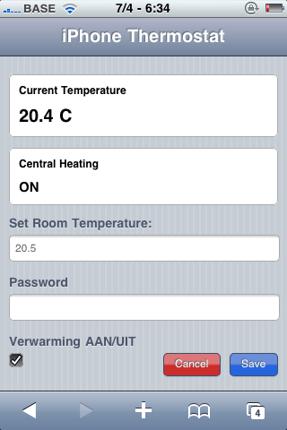
I dubbed it the iphone thermostat because the web interface worked well on an iphone (it mimics the iphone user interface with css/javascript):
iPhone thermostat


Well this weekend I decided to make a proper build of this idea. I've converted the breadboard and arduino into a single pcb (well stripboard with lotsa wires) and a standalone atmega328. I've got 4 wires left to do. +5v and gnd go to supply of the raspberry pi. TX and RX lines will go to the gpio of the raspberry pi (need a level shifter for that to go from 3.3 to 5v and waiting for that order ). Basically allowing me to run the web application on a raspberry pi and then have that control the wanted temperature.


Here is the build in progress:


Here is the build on my wall:


Tonight or tomorrow I'm gonna print a nice casing for it on my reprap.


Here is a video of it running for first time without arduino/breadboard:


Had a bit of a cold yesterday. Anyway I should mention it's going to be connected to a raspberry pi. The four wires you see in picture (is version on my wall today) are tx/rx for sending/receiving serial commands on the gpio of raspberry pi (much like sending g-codes to a printer, we can send and receive wanted and current temperature over serial). And a +5v & ground are exposed for also connecting to the raspberry pi. => Basically instead of using arduino usb serial, we use gpio to send/receive data from the atmega with a softserial and some gpio pins :
raspberry pi to arduino or atmega with gpio


The level shifter/buffer chip used in above link only costs about 40cents on mouser:
CD4050 level shift 3.3 to 5v


Ow yeah had a bit of a cold yesterday, so also forgot to mention the 12volt is used for switching on/off the relay. Most likely if i'd build this again I'd go for a 5v relay instead because then the 7805 regulator is not needed and I can use a 5v supply instead of a 12v supply. Also note that I like this not having batteries. The android post I saw is using the android battery, so that lasts about a day before your android is out of juice and you can't turn on your heat anymore .


The cool thing is that this circuit already worked flawlessly an entire winter last year. It's standalone atmega 328p controlling the heater and the rasp-pi only exposes some json calls and webpages to controll the set temperature and read out the current temperature.


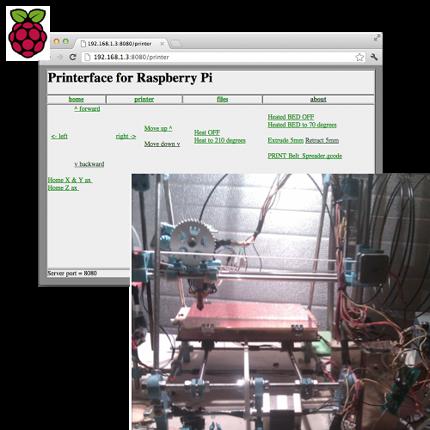
Control my Prusa 3D printer with a 35$ raspberry pi!

Written by Walter Schreppers on 09/10/2012 18:24:45.


Received my raspberry pi in the mail a few weeks ago. Figured how great it would be to let it control my printer instead of leaving my laptop in the garage all night. A day of hacking later in node.js and I had it up and running !


Future work this weekend will be done on the following:
1. Better stylesheet (most likely jquery mobile so I can also do it on my android phone ).
2. Add drop down box so you can select from all gcode files uploaded to print.
3. Add interface for a webcam which I will mount on the second printer. That way I can even print from work and watch the progress with some snapshots from the webcam (I have a cheap psp cam for that).
4. Once code is clean enough, release it into the wild on github !


Incidently my nice second black printer is completely printed with the first ugly blue one. Why? Because we can No really it has lots of improvements also, should be easier to maintain etc.
What I meant with controlling the printer without a laptop is that since it's just a site I can use my android phone or tablet as well! Even more cool is that on boot the raspberry reports it's ip to a webserver of mine so I can access it from anywhere, more on that in the next vid this weekend


UPDATE. It's now on github. I changed some things to make it work with pronsole which seems more stable. Still lots of work todo like adding stylesheets etc.

Printerface on github

Clone and hack/print the planet !


My prusa is replicating!

Written by Walter on 20/08/2012 16:52:54.

Printing the last few parts now, allmost got a prusa v3!


Here's the bridging (so the thing people think is normally not possible with layering without support material, we can still make bridges).


So now I've printed all parts for a second prusa (call it v3 as it has many parts improved from the original v2 I have now).

Here's some pics of the new frame etc.


Final x-ends allmost done here:


Frame nearing completion:


New filament/spool holder I designed with minimal parts works like a charm:


Changed my extruder to 0.35 millimeter and finding the right callibration settings for x-y accelleration made all the difference in getting quality prints:


Just had to pop this one in there too. Found a stargate at work, beam me up